

HTML (HyperText Markup Language) is the foundation of website development and one of the first technologies aspiring web developers should learn. It provides the basic structure of web pages, allowing developers to organize text, images, links, forms, and other website elements.
Whether you want to become a front-end developer, build your own website, or explore opportunities in the tech industry, understanding HTML is an essential first step.
If you are wondering how to master HTML, the good news is that you do not need prior programming or coding experience to get started. HTML is beginner-friendly, and with consistent practice, you can gradually develop the skills required to create functional web pages.
In this guide, we will explain how to master HTML from scratch, covering:
- Basic HTML concepts, tags, and attributes.
- Essential HTML elements and their applications.
- Useful tools and resources for learning HTML.
- Practical projects to strengthen your coding skills.
- Common mistakes beginners should avoid.
- Career opportunities available after learning HTML.
As you build your technical knowledge, platforms like CareerGrowKaro Jobs can help you explore relevant internships and job opportunities to take your first step towards a career in web development.
By the end of this guide, you will have a clear roadmap for how to master HTML and turn your beginner-level knowledge into practical coding skills.
What Is HTML?

HTML (HyperText Markup Language) is the standard markup language used to create and structure content on websites. It organizes webpage elements such as headings, paragraphs, images, links, tables, and forms, helping browsers display content correctly.
If you are learning how to master HTML, it is important to understand that HTML provides the basic structure of a webpage. It uses predefined tags enclosed in angle brackets (< >) to define different elements.
Some commonly used HTML tags include:
- <h1> to <h6> – Define headings and subheadings.
- <p> – Creates paragraphs.
- <a> – Adds hyperlinks.
- <img> – Displays images.
- <ul> and <ol> – Create lists.
- <table> – Organizes information into tables.
Think of HTML as the structure of a house, CSS as its interior design, and JavaScript as the functionality that makes everything work.
Understanding these three technologies will help you build a strong foundation in web development and make it easier to follow a structured approach to how to master HTML.
How to Master HTML Step by Step?
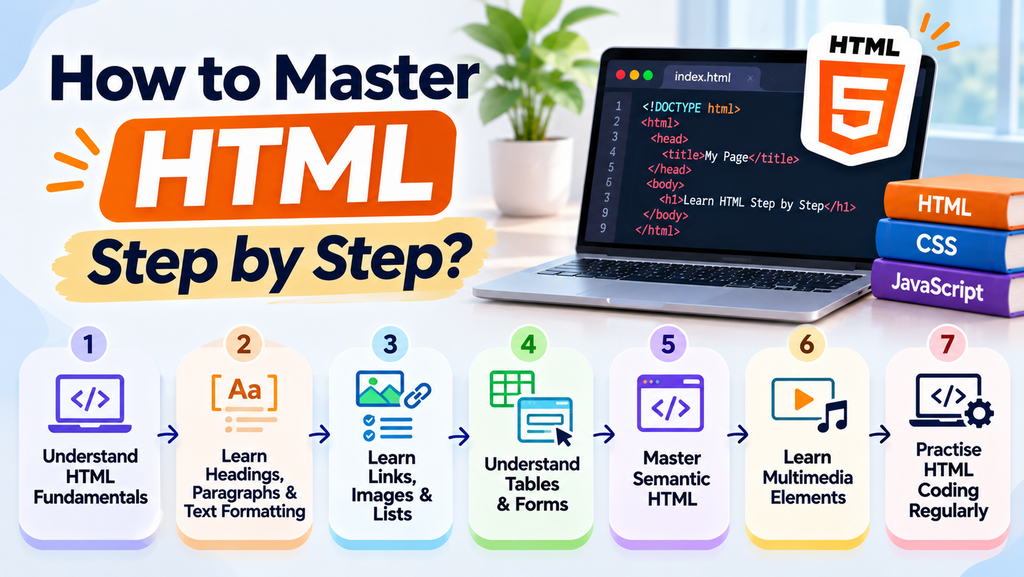
Learning HTML becomes easier when you follow a structured approach instead of trying to understand everything at once. If you are wondering how to master HTML, start with the fundamentals and gradually move towards practical coding exercises.
Here are seven steps to help you build your HTML skills from scratch.
Step 1: Understand HTML Fundamentals
The first step in learning how to master HTML is understanding its basic syntax and structure. Start by learning how HTML documents are created and how tags, elements, and attributes work together.
Focus on:
- Understanding opening and closing tags.
- Learning the basic HTML document structure.
- Identifying commonly used HTML elements.
- Practicing simple HTML code in a text editor.
Start by creating a basic webpage containing a heading and a paragraph. This will help you become familiar with HTML syntax.
Step 2: Learn HTML Headings, Paragraphs, and Text Formatting
Once you understand the basics, learn how to organize and format text. These elements are essential for creating readable and properly structured webpages.
Important HTML tags include:
- <h1> to <h6>: Create headings of different levels.
- <p>: Adds paragraphs.
- <b>: Makes text bold.
- <i>: Displays italic text.
- <strong>: Indicates important text.
- <em>: Adds emphasis to text.
- <br>: Inserts a line break.
- <hr>: Creates a horizontal line.
Practise using these tags to create a simple webpage with headings, paragraphs, and formatted text. This is an important part of understanding how to master HTML effectively.
Step 3: Learn Links, Images, and Lists
Websites often contain hyperlinks, images, and lists to make information easier to navigate and understand. Learning these elements is an important step in understanding how to master HTML and create well-structured, organized webpages.
Some important concepts include:
- Hyperlinks: Use the <a> tag to connect webpages or external websites.
- Images: Use the <img> tag to display images.
- Alt Text: Add descriptive text using the alt attribute to improve accessibility.
- Ordered Lists: Use <ol> to create numbered lists.
- Unordered Lists: Use <ul> to create bullet-point lists.
For example:
<a href=”https://example.com”>Visit Example</a>
<img src=”photo.jpg” alt=”Mountain landscape”>
<ul>
<li>HTML</li>
<li>CSS</li>
<li>JavaScript</li>
</ul>
Practicing these elements will help you understand how websites organize and display different types of content.
Step 4: Understand HTML Tables and Forms
The next step in learning how to master HTML is working with tables and forms. These elements are commonly used on websites to organize information and collect user data.
- HTML Tables: Use <table>, <tr>, <th> and <td> to arrange information into rows and columns.
- HTML Forms: Use <form> to collect information from website visitors.
- Input Fields: Use <input> to create text boxes, email fields, and other input types.
- Labels: Use <label> to describe form fields.
- Buttons: Use <button> to create clickable buttons.
- Dropdowns: Use <select> and <option> to create selection menus.
Try creating a simple student registration form with fields for name, email address, and phone number. This will help you understand how forms work in real-world websites.
Step 5: Master Semantic HTML
Semantic HTML refers to using elements that clearly describe the purpose of the content they contain. Instead of relying only on generic tags, semantic elements help browsers, search engines, and assistive technologies understand webpage structure.
Some commonly used semantic HTML tags include:
- <header>: Defines the header section.
- <footer>: Defines the footer section.
- <nav>: Contains navigation links.
- <main>: Represents the main content.
- <section>: Groups related content.
- <article>: Represents independent content.
Using semantic HTML improves website accessibility, makes code easier to maintain, and helps search engines understand webpage content.
Step 6: Learn HTML Multimedia Elements
Modern websites often include videos, audio files, and embedded external content. Learning multimedia elements is another important part of how to master HTML.
Some useful HTML tags include:
- <audio>: Adds audio files to webpages.
- <video>: Embeds videos directly into webpages.
- <iframe>: Displays external content, such as maps or embedded videos.
For example:
<video controls>
<source src=”video.mp4″ type=”video/mp4″>
</video>
Practise embedding audio and video files to understand how multimedia content works within an HTML document.
Step 7: Practice HTML Coding Regularly
The best way to strengthen your understanding of how to master HTML is through consistent hands-on practice. Reading tutorials and watching videos can help you understand concepts, but writing code yourself is essential for developing practical skills.
Follow these simple practices:
- Write HTML code regularly instead of only watching tutorials.
- Experiment with different HTML tags and attributes.
- Identify coding errors and learn how to fix them.
- Recreate simple website layouts to improve your understanding.
- Build small projects such as personal webpages and registration forms.
- Review your code and look for ways to improve its structure.
Regular practice will help you become more confident with HTML and prepare you to explore advanced web development technologies.
What Are the Basic Concepts of HTML You Should Know?

Before learning advanced web development, beginners should understand a few fundamental HTML concepts. These concepts help you understand how webpages are structured and how different elements work together.
HTML Elements and Tags
HTML tags are keywords enclosed in angle brackets (< >) that define different elements on a webpage. Most HTML elements have an opening tag and a closing tag, with content placed between them.
For example:
<h1>Welcome to My Website</h1>
<p>This is my first webpage.</p>
Here, <h1> defines a heading, while <p> defines a paragraph. Some elements, such as <img> and <br>, do not require closing tags.
HTML Attributes
HTML attributes provide additional information about elements. They are generally written inside the opening tag and consist of a name and a value.
Some commonly used HTML attributes include:
- href: Specifies the destination of a hyperlink.
- src: Defines the source of an image or media file.
- alt: Provides alternative text for images.
- id: Assigns a unique identifier to an element.
- class: Groups elements for styling or other purposes.
Example:
<a href=”https://example.com”>Visit Website</a>
<img src=”image.jpg” alt=”A beautiful landscape”>
HTML Document Structure
Every HTML webpage follows a basic document structure that helps browsers understand and display its content.
The main components include:
- <!DOCTYPE html>: Declares the document as HTML5.
- <html>: Defines the root of the HTML document.
- <head>: Contains metadata and the webpage title.
- <body>: Contains the visible content displayed on the webpage.
A basic HTML document looks like this:
<!DOCTYPE html>
<html>
<head>
<title>My First Webpage</title>
</head>
<body>
<h1>Hello World!</h1>
<p>Welcome to my first HTML page.</p>
</body>
</html>
Understanding this structure will help you write organized HTML code and create your first webpage.
What Are the Best Tools and Resources to Learn HTML?

Choosing the right learning resources can make your HTML learning journey easier and more effective. Several free and beginner-friendly platforms offer tutorials, coding exercises, and practical examples to help you understand HTML from scratch.
If you are exploring how to master HTML, consider using the following tools and resources:
| Platform | What You Can Learn |
| MDN Web Docs | Comprehensive HTML documentation, tutorials, and detailed explanations of HTML elements. |
| W3Schools | HTML basics, interactive examples, coding exercises, and beginner-friendly tutorials. |
| freeCodeCamp | Interactive HTML lessons, practical coding exercises, and project-based learning. |
| Codecademy | Structured HTML courses with guided lessons and hands-on practice. |
| CodePen | An online code editor where you can experiment with HTML and instantly preview your webpages. |
You do not need to use every platform simultaneously. Choose one primary learning resource and combine it with regular coding practice to strengthen your understanding.
How Long Does It Take to Master HTML?
The time required to learn HTML depends on your learning pace, previous experience, and how consistently you practice. Since HTML is beginner-friendly, you can understand its fundamentals within a few weeks and gradually develop the confidence to build webpages independently.
If you are wondering how long it takes to master HTML, here is a realistic learning timeline for beginners:
| Learning Duration | What You Can Achieve |
| 1–2 Weeks | Understand HTML fundamentals, basic tags, elements, attributes, and document structure. |
| 3–4 Weeks | Work with forms, tables, hyperlinks, images, lists, and semantic HTML elements. |
| 1–2 Months | Build independent HTML projects, practice website structures, and improve your coding confidence. |
Learning HTML basics may take a few weeks, but becoming confident in applying them requires consistent hands-on practice. Once you have a strong foundation, you can move towards CSS and JavaScript to expand your web development skills.
What Career Opportunities Can You Explore After Learning HTML?
Learning HTML can open doors to various opportunities in the web development and technology industries. While HTML alone may not be sufficient for most technical roles, combining it with CSS, JavaScript, and responsive web design can help you qualify for different entry-level positions.
If you are exploring how to master HTML to build a career in technology, here are five career options worth considering.
1. Front-End Developer
A front-end developer creates the visual and interactive parts of websites that users interact with. Understanding how to master HTML provides the foundation for structuring webpages, while CSS and JavaScript help improve their design and functionality.
Roles and responsibilities:
- Create and structure website pages using HTML.
- Develop responsive layouts using CSS.
- Add interactive features using JavaScript.
- Improve website usability and accessibility.
- Collaborate with designers and backend developers.
Key skills: HTML, CSS, JavaScript, responsive design, and basic UI/UX principles.
2. Web Developer
Web developers build, maintain, and update websites according to business or client requirements. Learning how to master HTML helps beginners understand webpage structures and work with other essential web development technologies.
Roles and responsibilities:
- Develop and maintain website pages.
- Create website layouts and content structures.
- Fix website errors and improve functionality.
- Test websites across different browsers and devices.
- Collaborate with clients and development teams.
Key skills: HTML, CSS, JavaScript, website development, and basic programming knowledge.
3. HTML Email Developer
HTML email developers create and format promotional emails, newsletters, and marketing campaigns. They use HTML to structure email content and CSS to improve its appearance across different email platforms.
Roles and responsibilities:
- Create HTML-based email templates.
- Design promotional emails and newsletters.
- Ensure emails display correctly across devices.
- Test email layouts across different email clients.
- Maintain consistency in email formatting and design.
Key skills: HTML, CSS, email templates, responsive email design, and email testing.
4. WordPress Developer
WordPress developers create, customize, and maintain websites using the WordPress platform. Understanding how to master HTML helps them modify website layouts, customize themes, and make content-related changes.
Roles and responsibilities:
- Create and customize WordPress websites.
- Modify website layouts and themes.
- Update website content and page structures.
- Troubleshoot basic website issues.
- Improve website appearance and responsiveness.
Key skills: HTML, CSS, WordPress, PHP basics, and website customization.
5. UI Developer
UI developers work on creating user-friendly website interfaces by combining design principles with front-end development skills. HTML helps them structure interface elements such as buttons, forms, navigation menus, and content sections.
Roles and responsibilities:
- Develop website interfaces using HTML and CSS.
- Convert design layouts into functional webpages.
- Create responsive navigation menus and forms.
- Improve website usability and accessibility.
- Work with designers to implement interface requirements.
Key skills: HTML, CSS, JavaScript, responsive design, and UI development fundamentals.
How Can You Prepare for These Opportunities?
To improve your chances of entering the web development industry, focus on developing skills beyond basic HTML knowledge.
- Learn CSS and JavaScript to build functional websites.
- Create a portfolio showcasing your completed projects.
- Practice building responsive and user-friendly webpages.
- Learn to use code editors and browser developer tools.
- Apply for internships and entry-level positions to gain practical experience.
Remember, HTML is your starting point. Combining it with practical projects and additional technical skills can help you build a stronger foundation for a career in web development.
Conclusion
Learning HTML is an important first step towards building a career in web development. Although mastering its fundamentals does not happen overnight, following a structured learning approach and practicing regularly can help you develop strong coding skills.
If you are still wondering how to master HTML, remember that consistency matters more than rushing through tutorials. Start with basic tags and elements, experiment with different HTML features, and gradually move towards building independent projects.
Here are a few key takeaways to remember:
- Focus on understanding HTML fundamentals before moving to advanced concepts.
- Practice coding regularly and work on real-world projects.
- Learn CSS and JavaScript to expand your web development skills.
- Build a portfolio to showcase your practical knowledge.
- Keep exploring new tools and technologies to improve your skills.
Ultimately, understanding how to master HTML can help you build a strong foundation for exploring opportunities in the technology industry. To take the next step, explore CareerGrowKaro Jobs for relevant internships and entry-level opportunities that can help you gain practical experience and begin your professional journey.
FAQs
1. How to Master HTML as a Complete Beginner?
To understand how to master HTML as a beginner, start by learning basic tags, elements, attributes, and document structure. Practise writing simple HTML code daily and gradually move towards building small webpages and projects.
2. How Long Does It Take to Master HTML?
Learning how to master HTML basics can take around 1–2 weeks, while developing confidence in building independent webpages may take 1–2 months. Your progress depends on your practice routine and learning pace.
3. Can I Learn HTML Without Prior Coding Knowledge?
Yes, learning how to master HTML does not require prior programming experience. HTML is beginner-friendly, and you can start by understanding basic tags and gradually progress to more complex webpage structures.
4. Is HTML Enough to Get a Job?
Learning how to master HTML provides a foundation for web development, but HTML alone is generally not sufficient for most development roles. You should also learn CSS, JavaScript, and responsive web design to improve your job prospects.
5. What Should I Learn After HTML?
Once you understand how to master HTML, the next step is learning CSS for webpage styling, followed by JavaScript for adding interactive features. You can also explore frameworks and libraries as your skills develop.
6. Which Is the Best Website to Learn HTML for Free?
If you want to learn how to master HTML for free, platforms such as MDN Web Docs, W3Schools, and freeCodeCamp offer beginner-friendly tutorials, interactive exercises, and practical examples.
7. Can I practice HTML on my mobile phone?
Yes, you can practice how to master HTML using mobile-friendly coding platforms and online editors. However, using a laptop or desktop is generally more convenient for writing, testing, and managing larger HTML projects.