
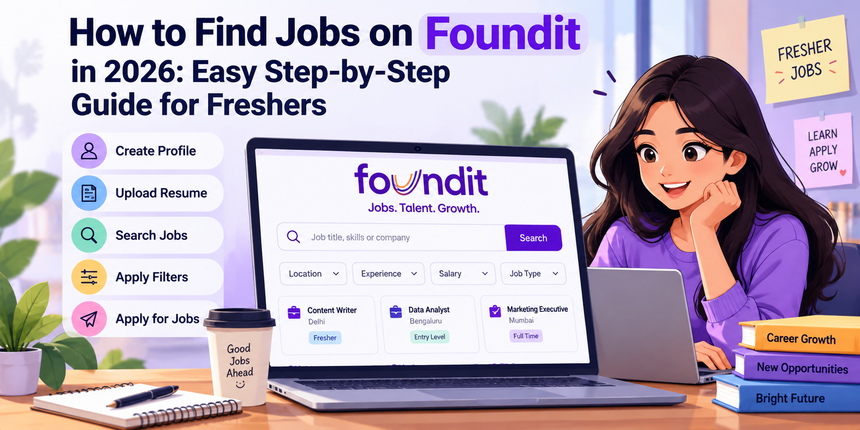
Finding the right job has become easier with online job portals that connect job seekers with employers across industries. Foundit is one such platform where candidates can explore employment opportunities based on their skills, qualifications, experience, and preferred location. However, many freshers struggle with creating a complete profile, finding relevant vacancies, and applying for suitable positions.
Knowing how to find jobs on Foundit can help candidates streamline their job search and discover opportunities that match their career goals. Whether you are a fresher looking for your first job or an experienced professional seeking a new opportunity, understanding the platform can help you:
- Create a professional profile that highlights your qualifications and skills.
- Upload an updated resume to showcase your experience and achievements.
- Search for relevant vacancies using job titles, locations, and available filters.
- Apply for suitable positions and keep track of your applications.
- Avoid common job search mistakes and identify potentially fraudulent job offers.
This guide explains how to find jobs on Foundit, from creating an account to applying for relevant vacancies. At CareerGrowKaro, we aim to help job seekers make informed career decisions through practical guidance and useful resources.
Read on to learn how to find jobs on Foundit and make your job search more organized and effective.
What Is Foundit?
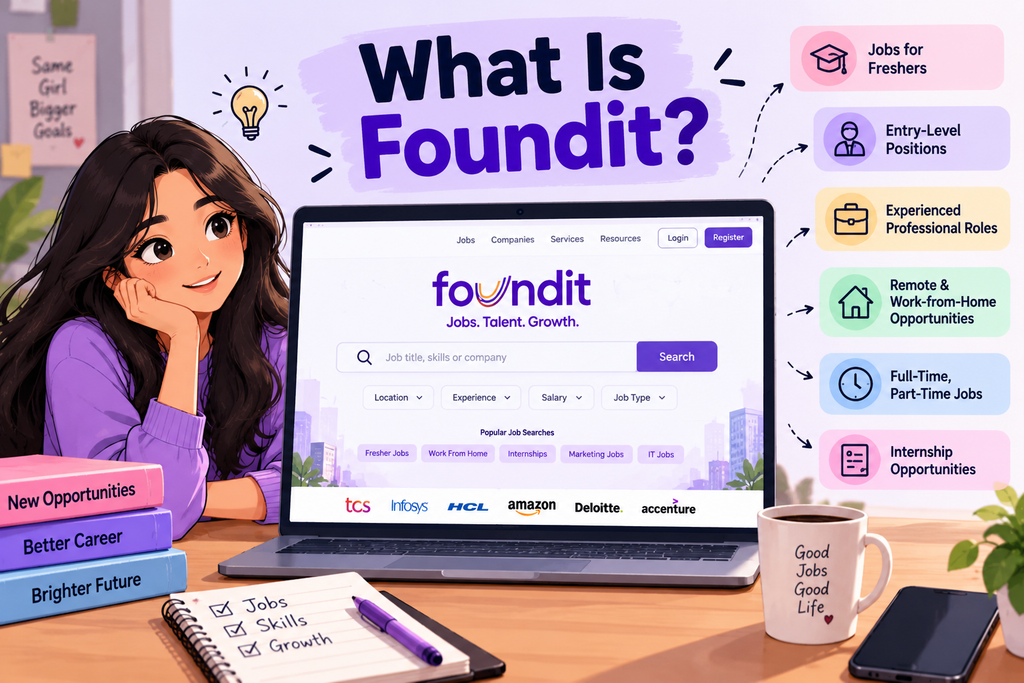
Foundit is an online job portal that connects job seekers with employers across different industries. Previously known as Monster India, the platform was rebranded as Foundit in 2022. It helps candidates discover relevant job openings based on their qualifications, skills, work experience, and preferred locations.
Job seekers can use Foundit to explore various employment opportunities, including:
- Jobs for Freshers: Entry-level vacancies for recent graduates and candidates looking for their first job.
- Entry-Level Positions: Opportunities for candidates with limited professional experience who want to begin their careers.
- Experienced Professional Roles: Job openings for professionals looking to advance their careers or switch companies.
- Remote and Work-from-Home Jobs: Opportunities that allow candidates to work remotely, depending on the employer’s requirements.
- Full-Time and Part-Time Jobs: Employment options for candidates seeking different work arrangements.
- Internship Opportunities: Positions that help students and recent graduates gain practical experience and develop professional skills.
The platform allows candidates to explore opportunities across sectors such as information technology, marketing, finance, sales, human resources, customer service, and other professional fields. By using relevant keywords and available search filters, job seekers can narrow down listings according to their career goals.
Understanding how to find jobs on Foundit can help candidates navigate the platform more effectively, identify suitable vacancies, and apply for relevant positions. Whether you are searching for your first job or planning a career change, Foundit can be a useful resource in your job search.
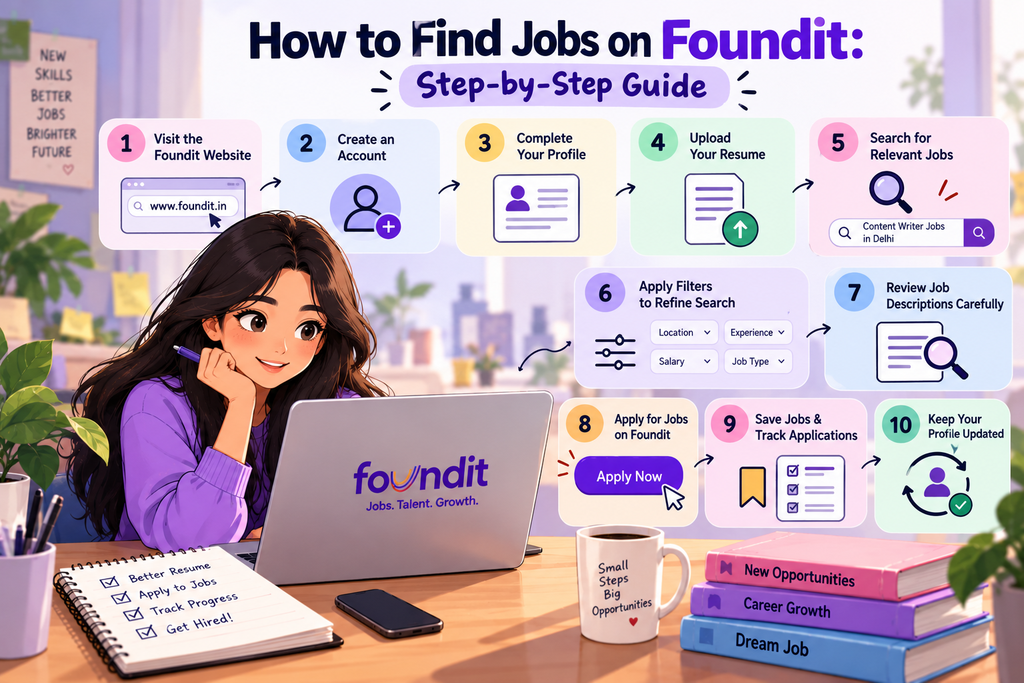
How to Find Jobs on Foundit: Step-by-Step Guide
Step 1: Visit the Foundit Website
The first step in learning how to find jobs on Foundit is to visit the official website at foundit.in. The homepage provides access to job search options and account registration features.
Once you open the website, look for the job search section. You can begin exploring opportunities by entering relevant job titles, skills, or preferred locations. If you are a new user, you can also explore the registration options to create an account and access the platform’s available features.
Before proceeding, ensure you are using the official website to protect your personal information.
Step 2: Create an Account on Foundit
Creating an account helps you establish a profile and access the platform’s available job-seeking features. To begin the registration process:
- Visit the Foundit website.
- Look for the registration or sign-up option.
- Enter the requested details, which may include your name, email address, and mobile number.
- Follow the on-screen instructions to complete registration.
- Complete any email or mobile verification required by the platform.
Use an active email address and mobile number because recruiters may use these details to contact you about relevant opportunities.
Completing the registration process is an important part of learning how to find jobs on Foundit, as it helps you build a profile that reflects your professional background and career interests.
Step 3: Complete Your Foundit Profile
A complete profile is an essential part of understanding how to find jobs on Foundit because it helps recruiters understand your qualifications, professional experience, and suitability for different roles.
Make sure you include the following details:
- Educational Qualifications: Mention your degree, college or university, specialization, and graduation year.
- Work Experience: Add details of your previous employment, internships, and relevant professional responsibilities.
- Technical and Soft Skills: Highlight skills that align with your target job roles.
- Preferred Job Roles: Specify the positions you want to pursue, such as Content Writer, Digital Marketing Executive, or Data Analyst.
- Preferred Locations: Mention the cities or regions where you are willing to work.
- Notice Period: If applicable, provide accurate information about your availability to join.
Freshers without formal work experience can highlight academic projects, internships, certifications, volunteer work, and relevant extracurricular activities.
Keep your information accurate and consistent with your resume. A complete profile can help recruiters assess your suitability for relevant opportunities.
Step 4: Upload Your Resume on Foundit
Uploading an updated resume is an important step in how to find jobs on Foundit, as it allows you to present your qualifications, skills, and achievements to potential employers.
To upload your resume, sign in to your account and look for the profile, resume management, or resume upload section. Follow the available instructions to upload your file in a supported format.
Before uploading, make sure your resume includes:
- Your latest contact information.
- Relevant educational qualifications.
- Work experience and internships, if applicable.
- Technical skills and industry-specific competencies.
- Certifications, academic projects, and achievements relevant to the position.
Customize your resume for your target role. For example, if you are applying for a content writing position, highlight your writing samples, SEO knowledge, research skills, and relevant experience.
You should also incorporate relevant keywords from job descriptions naturally. Avoid keyword stuffing or adding skills you do not possess.
Finally, check your contact details, spelling, formatting, and file readability before uploading your resume.
Step 5: Search for Relevant Jobs on Foundit
Once your profile is ready, start exploring how to find jobs on Foundit by using the job search bar to discover opportunities that match your career goals.
You can search using:
- Job Titles: Content Writer, HR Executive, Software Developer, or Data Analyst.
- Skills: SEO, digital marketing, Python, financial analysis, or graphic design.
- Company Names: Search for a particular employer if you want to explore its vacancies.
- Industries: Marketing, finance, information technology, education, or healthcare.
- Locations: Delhi, Noida, Gurugram, Bengaluru, or other preferred cities.
For example, instead of searching for a broad term such as marketing jobs, try more specific searches such as Content Writer Jobs in Delhi or Data Analyst Jobs for Freshers.
Specific keywords can help you identify more relevant listings and reduce the time spent reviewing unrelated opportunities.
Step 6: Apply Filters to Refine Your Job Search
Using filters is another useful part of how to find jobs on Foundit, as it helps you narrow down search results and focus on vacancies that match your requirements.
Depending on the available options, you may be able to refine your search using:
- Location: Find opportunities in your preferred city or region.
- Experience Level: Focus on fresher, entry-level, or experienced professional positions.
- Salary Range: Identify jobs that align with your salary expectations.
- Industry: Explore vacancies in your preferred sector.
- Employment Type: Look for relevant full-time, part-time, or other employment arrangements.
- Date Posted: Prioritize recently published vacancies.
For instance, a recent graduate searching for a marketing role in Delhi can use the location and experience filters to focus on relevant entry-level opportunities.
Filter availability may vary depending on the search and the platform interface. Review the options displayed on Foundit and adjust them according to your requirements.
Using filters can help you avoid irrelevant vacancies and spend more time applying for suitable positions.
Step 7: Review Job Descriptions Carefully
Before applying, understand how to find jobs on Foundit effectively by carefully reviewing each job description and checking whether the role suits your qualifications, skills, and career goals.
Pay attention to the following details:
- Job Responsibilities: Understand the tasks you will be expected to perform.
- Required Qualifications: Check the educational qualifications and certifications mentioned by the employer.
- Essential Skills: Identify the technical and soft skills required for the position.
- Experience Requirements: Confirm whether the employer accepts freshers or requires prior work experience.
- Salary and Benefits: Review the compensation details and benefits, if disclosed.
- Work Location: Check the office location and whether remote or hybrid work is available.
- Application Deadline: Note any specified deadline for submitting your application.
Do not apply simply because a job title sounds appealing. Compare the requirements with your qualifications and prioritize positions for which you meet the essential criteria.
Carefully reviewing job descriptions can help you make informed decisions and submit more relevant applications.
Step 8: Apply for Jobs on Foundit
Once you identify a suitable vacancy, the next step in how to find jobs on Foundit is to complete the application process by following the instructions provided in the job listing.
Follow these general steps:
- Open the job listing you want to apply for.
- Read the job description and eligibility requirements carefully.
- Look for the available application option.
- Follow the on-screen instructions to submit your application.
- Upload or select the appropriate resume if requested.
- Provide any additional information required by the employer.
- Review your details and submit the application.
Some listings may allow you to apply directly through Foundit, while others may redirect you to the employer’s official website or another application page.
Before submitting your application, double-check your contact details, resume, and responses to any screening questions. Ensure that the information you provide is accurate and relevant to the position.
Once submitted, check for any confirmation or application status information made available through the platform.
Step 9: Save Relevant Jobs and Track Applications
An important part of how to find jobs on Foundit is keeping track of the vacancies you find and the applications you submit. This helps you stay organized when applying for multiple positions.
Use available job-saving or bookmarking features to keep relevant vacancies accessible. You can also maintain a simple application tracker using a spreadsheet or notebook.
Include the following details:
- Company Name: The organization offering the position.
- Job Title: The role you applied for.
- Application Date: The date you submitted your application.
- Application Status: Any status update you receive.
- Follow-Up Date: The date you plan to follow up, if appropriate.
For example, you can record whether you have applied for a Content Writer position, received an interview invitation, or are waiting for a response.
Tracking your applications helps you stay organized, prepare for interviews, and avoid submitting duplicate applications for the same vacancy unnecessarily.
Remember that saving a job and applying for it are two different actions. If you find a suitable opportunity, make sure you complete the application process before treating it as an application submitted.
Step 10: Keep Your Profile Updated
The final step in how to find jobs on Foundit is to keep your profile and resume updated as your skills, experience, and career goals evolve.
Follow these practices to maintain an effective profile:
- Update your resume whenever you gain new skills, certifications, or professional experience.
- Add relevant internships, projects, and achievements.
- Correct outdated information, including contact details and employment history.
- Review your preferred job roles and locations as your career goals evolve.
- Check the platform regularly for new vacancies that match your profile.
- Review your application updates and respond promptly to relevant recruiter communications.
Freshers learning how to find jobs on Foundit should also update their profiles as they complete courses, gain internship experience, or develop new skills.
A current profile ensures that the information you present to recruiters remains accurate. Combine regular profile updates with targeted applications to make better use of the opportunities available on Foundit.
Common Mistakes to Avoid While Searching for Jobs on Foundit
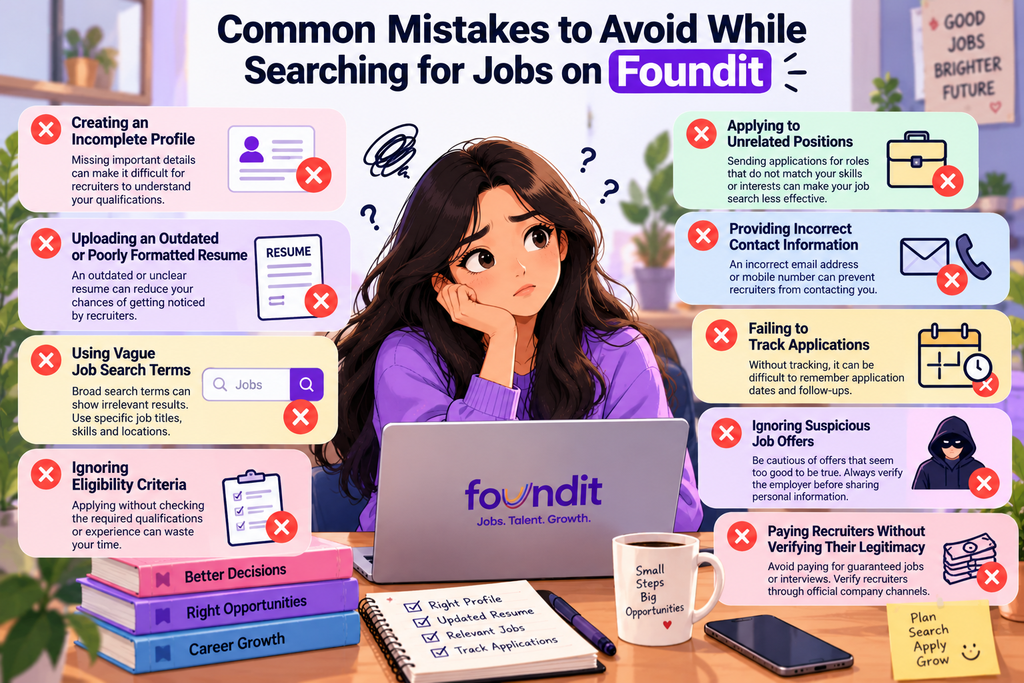
Knowing how to find jobs on Foundit effectively is just as important as knowing how to search for vacancies. While Foundit provides access to employment opportunities across industries, certain mistakes can make your job search less productive. Avoid the following errors to improve your application process and focus on relevant opportunities.
- Creating an Incomplete Profile: Leaving important sections of your profile blank can make it difficult for recruiters to understand your qualifications. Add relevant details about your education, skills, internships, and work experience.
- Uploading an Outdated or Poorly Formatted Resume: Your resume should reflect your latest qualifications and achievements. Use a professional format, check for spelling errors, and ensure that your contact information is correct before uploading it.
- Using Vague Job Search Terms: Searching with broad terms can produce irrelevant results. Use specific job titles, skills, and preferred locations to discover vacancies that match your career goals.
- Ignoring Eligibility Criteria: Applying without checking the required qualifications, experience, or skills can waste time. Read the job description carefully before submitting your application.
- Applying to Unrelated Positions: Sending applications for roles that do not match your skills or interests can make your job search less focused. Prioritize opportunities that align with your qualifications and career objectives.
- Providing Incorrect Contact Information: An incorrect email address or mobile number can prevent recruiters from contacting you. Double-check your details and keep them updated.
- Failing to Track Applications: Applying for multiple jobs without maintaining a record can make it difficult to remember application dates and follow-ups. Use a spreadsheet or notebook to track your applications and their status.
- Ignoring Suspicious Job Offers: Be cautious of recruiters who promise guaranteed employment without a proper selection process. Verify the employer and review the job details before sharing personal information.
- Paying Recruiters Without Verifying Their Legitimacy: Be wary of requests for money in exchange for guaranteed jobs, interviews, or recruitment opportunities. Verify the recruiter through official company channels and never share sensitive financial information unnecessarily.
Avoiding these mistakes can make your job search more organized and effective. When learning how to find jobs on Foundit, focus on maintaining an updated profile, applying for relevant vacancies, and verifying opportunities before proceeding.
Remember that how to find jobs on Foundit successfully depends on more than submitting multiple applications. A targeted approach, a professional resume, and careful evaluation of job listings can help you identify suitable opportunities. By understanding how to find jobs on Foundit and avoiding these common errors, you can make better use of the platform and improve your job search experience.
Conclusion
Finding the right job becomes easier when you have a clear strategy and know how to use online job portals effectively. By creating a complete profile, uploading an updated resume, using relevant search filters, and applying for suitable vacancies, you can make your job search more organized and productive. Understanding how to find jobs on Foundit can help you discover opportunities that align with your qualifications, skills, and career goals.
Whether you are a fresher searching for your first job or an experienced professional planning a career change, consistency and targeted applications are essential. Remember to keep your profile updated, track your applications, and verify job listings before sharing personal information or proceeding with a recruiter. By following these steps, you can learn how to find jobs on Foundit more effectively and take a step closer to achieving your career goals.
At CareerGrowKaro, we aim to simplify your career journey with practical job search guides, resume tips, and career resources. Start applying these steps today to make the most of how to find jobs on Foundit and move closer to your professional goals.
FAQs
1. How do I find jobs on Foundit?
To understand how to find jobs on Foundit, visit the official website, create an account, and complete your profile. Upload your resume, search using relevant job titles or skills, apply available filters, and submit applications for vacancies that match your qualifications and career goals.
2. Is Foundit free for job seekers?
Yes, Foundit provides job search and application features for job seekers, although certain optional services may be chargeable. When learning how to find jobs on Foundit, check the platform’s current pricing and terms to understand which services are free and which require payment.
3. How can freshers find jobs on Foundit?
Freshers exploring how to find jobs on Foundit can search for entry-level positions using keywords such as “fresher jobs,” “graduate jobs,” or specific job titles followed by their preferred location. They should also highlight their educational qualifications, internships, academic projects, certifications, and relevant skills in their profiles and resumes.
4. How do I upload my resume on Foundit?
To follow how to find jobs on Foundit effectively, sign in to your account and navigate to the profile or resume management section. Follow the on-screen instructions to upload your updated resume in a supported file format, ensuring your contact information, educational details, and skills are accurate.
5. Can I apply for jobs on Foundit without work experience?
Yes, candidates without prior professional experience can apply for suitable fresher and entry-level vacancies. As part of learning how to find jobs on Foundit, look for positions that accept recent graduates and emphasize relevant skills, academic projects, internships, and certifications in your application.
6. How can I improve my chances of getting a job through Foundit?
Understanding how to find jobs on Foundit can help you develop a more effective job search strategy. Maintain a complete profile, upload a professional resume, use relevant keywords, and apply for positions that match your qualifications. Regularly check for new vacancies, track your applications, and prepare for interviews.
7. How can I check my job application status on Foundit?
After learning how to find jobs on Foundit and submitting applications, sign in to your account and look for any available application tracking or status features. The information displayed depends on the platform’s functionality and the employer’s recruitment process. If you are redirected to an employer’s website to apply, you may need to check your application status there.
8. Is Foundit safe to use for job searching?
Foundit can be used to explore employment opportunities, but understanding how to find jobs on Foundit safely also involves verifying employers and job listings