

Are you preparing for your first job but unsure which technical skills employers expect? Learning Microsoft Excel can give you an advantage when applying for entry-level positions in India. From data entry and HR to finance and operations, companies across industries rely on spreadsheets to manage everyday tasks.
If you are exploring opportunities through CareerGrowKaro Jobs, you will come across several entry-level openings where Excel proficiency is an important requirement. Understanding Excel skills for jobs can help you identify the right skills, prepare for practical interview tests, and improve your chances of getting hired.
The good news is that you do not need an expensive course to get started. With regular practice, you can develop essential Excel skills in 30 days and demonstrate your knowledge through practical projects.
| Quick Answer: Excel skills for jobs are divided into three levels: basic, intermediate, and advanced. Basic Excel can help you qualify for data entry and office assistant roles, while intermediate Excel is useful for HR, accounts, and MIS positions. Advanced Excel supports data analyst and reporting roles. The five commonly tested skills include formatting, SUM/IF, VLOOKUP/XLOOKUP, pivot tables, and charts. Learn free in 30 days and prove it with a mini-project. |
What Are Excel Skills for Jobs?
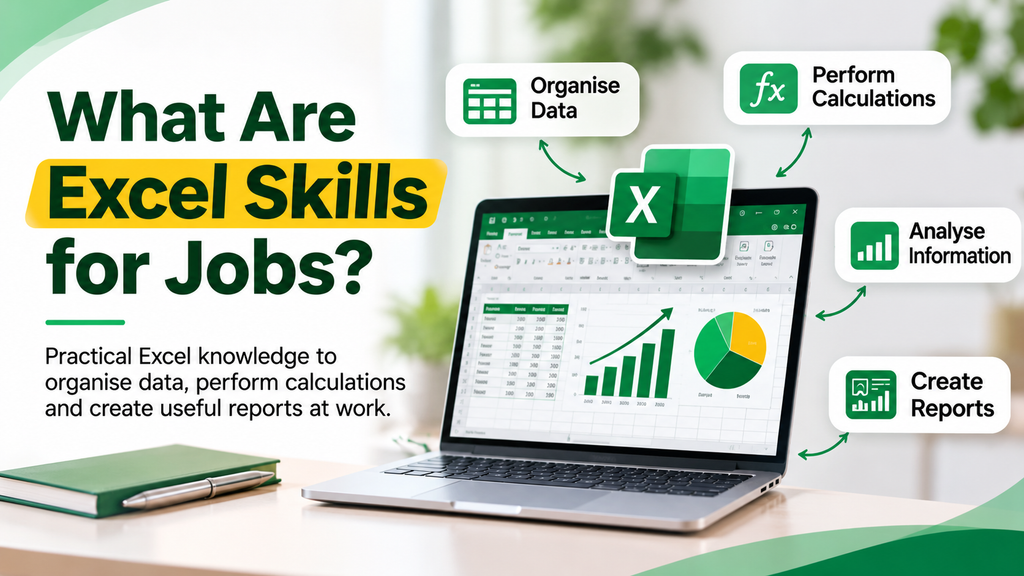
Excel skills refer to your ability to use Microsoft Excel to enter, organize, calculate, analyze, and present information in spreadsheets. Businesses across industries use Excel to manage daily operations, maintain records, and prepare reports.
Indian employers value Excel proficiency because it helps employees manage information accurately, complete routine tasks efficiently, and make better business decisions.
Here are five reasons why employers look for candidates with Excel knowledge:
1. Data Management: Excel helps employees organize customer details, employee records, attendance sheets, and business information. It makes storing, updating, and retrieving information easier.
2. Faster Calculations: Functions such as SUM, AVERAGE, and IF help perform calculations automatically. Employees can calculate expenses, salaries, sales figures, and other business metrics without manually processing every entry.
3. Data Analysis: Excel allows employees to compare information, identify patterns, and understand business performance. Features such as filters, pivot tables, and charts make analyzing data easier.
4. Report Preparation: Companies use Excel to prepare daily, weekly, and monthly reports. Employees can organize information, highlight important figures, and present findings to managers.
5. Workplace Productivity: Knowledge of Excel helps employees complete repetitive tasks efficiently, reduce manual errors, and save time on everyday responsibilities.
Pro Tip: You do not need advanced Excel knowledge to start applying for jobs. Begin with basic formulas, cell formatting, sorting, and filtering. Once you are comfortable with these concepts, gradually move towards intermediate functions.
Understanding these applications will help you identify which Excel skills for jobs you should prioritize based on your career goals.
Which Jobs in India Need Excel?
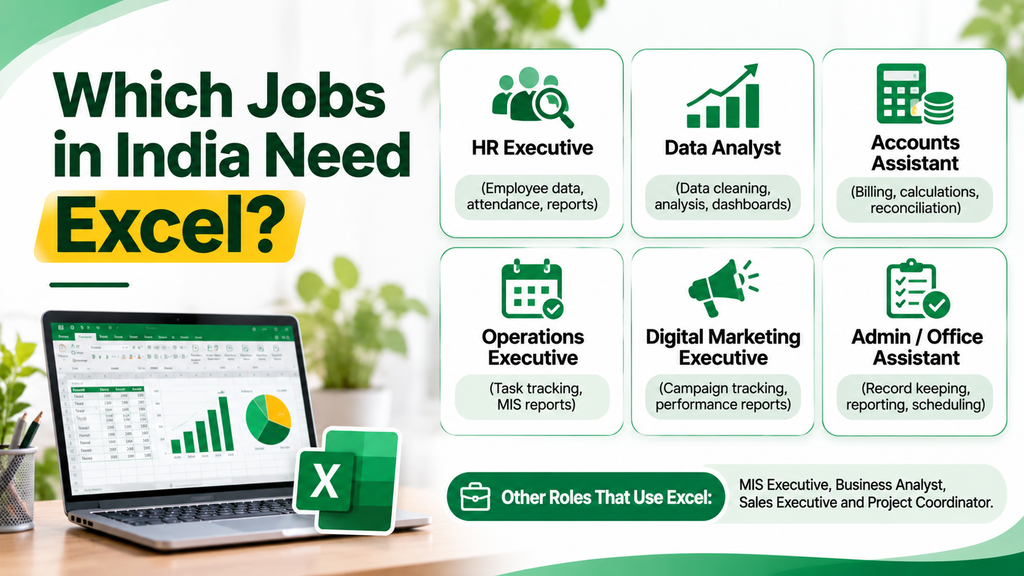
Excel is not limited to data entry or accounting jobs. Companies across industries use spreadsheets to manage employee information, track sales, maintain financial records, and prepare business reports.
For freshers, learning Excel skills for jobs can open opportunities in departments such as HR, finance, marketing, administration, and operations.
Here are some common entry-level job roles where Excel knowledge is useful.
1. Data Entry Executive
A data entry executive is responsible for entering, updating, and maintaining information in company databases and spreadsheets.
Daily responsibilities:
- Entering customer and employee information.
- Updating records and databases.
- Checking data for errors and duplicate entries.
- Organizing information using sorting and filtering.
- Maintaining digital records.
Excel level required: Basic
Important skills: Data formatting, sorting, filtering, and SUM and COUNT functions.
Expected fresher salary: ₹13,500–₹20,000 per month.
2. MIS Executive
A Management Information System (MIS) executive prepares reports and manages business data to help companies monitor their performance.
Daily responsibilities:
- Preparing daily, weekly, and monthly reports.
- Maintaining sales and performance trackers.
- Organizing large datasets.
- Creating pivot tables and charts.
- Analyzing business information.
Excel level required: Intermediate to Advanced
Important skills: VLOOKUP, XLOOKUP, IF, pivot tables, and dashboards.
Expected fresher salary: ₹15,000–₹25,000 per month.
3. HR Executive
HR Executives use Excel to maintain employee records and manage recruitment-related information.
Daily responsibilities:
- Maintaining employee databases.
- Tracking attendance and leave records.
- Preparing recruitment trackers.
- Managing interview schedules.
- Organizing employee information.
Excel level required: Basic to Intermediate
Important skills: IF, COUNTIF, data validation, sorting, and filtering.
Expected fresher salary: Varies by employer and location.
4. Accounts Assistant
Accounts assistants use Excel to organize financial information, maintain expense records, and perform basic calculations.
Daily responsibilities:
- Maintaining financial records.
- Recording daily expenses and transactions.
- Preparing basic financial reports.
- Calculating totals and outstanding payments.
- Organizing invoices and payment information.
Excel level required: Intermediate
Important skills: SUM, SUMIF, IF, cell references, and basic financial calculations.
Expected fresher salary: Varies by employer and location.
5. Operations Executive
Operations executives help businesses manage their everyday activities and maintain operational records.
Daily responsibilities:
- Maintaining order and inventory records.
- Tracking daily operational activities.
- Preparing performance reports.
- Updating project and task trackers.
- Monitoring operational data.
Excel level required: Basic to Intermediate
Important skills: Sorting, filtering, SUMIF, IF, and pivot tables.
Expected fresher salary: Varies by employer and location.
6. Sales Coordinator
Sales coordinators support sales teams by maintaining customer information, tracking targets, and preparing performance reports.
Daily responsibilities:
- Maintaining customer databases.
- Tracking monthly sales targets.
- Preparing sales performance reports.
- Updating product and order information.
- Monitoring revenue and sales figures.
Excel level required: Basic to Intermediate
Important skills: SUM, IF, VLOOKUP, charts, and conditional formatting.
Expected fresher salary: Varies by employer and location.
7. Junior Data Analyst
Junior data analysts work with datasets to identify patterns, analyze information, and prepare reports that support business decisions.
Daily responsibilities:
- Collecting and cleaning datasets.
- Identifying trends and patterns.
- Preparing reports and dashboards.
- Analyzing business performance.
- Presenting data insights to team members.
Excel level required: Advanced
Important skills: Advanced formulas, pivot tables, Power Query, charts, and dashboards.
Expected fresher salary: ₹25,000–₹45,000 per month.
Excel is an important workplace skill, but employers may also expect communication, problem-solving, and industry-specific knowledge. Choose a role based on your overall skill set rather than Excel proficiency alone.
Basic, Intermediate, or Advanced: Which Excel Level Do You Need?
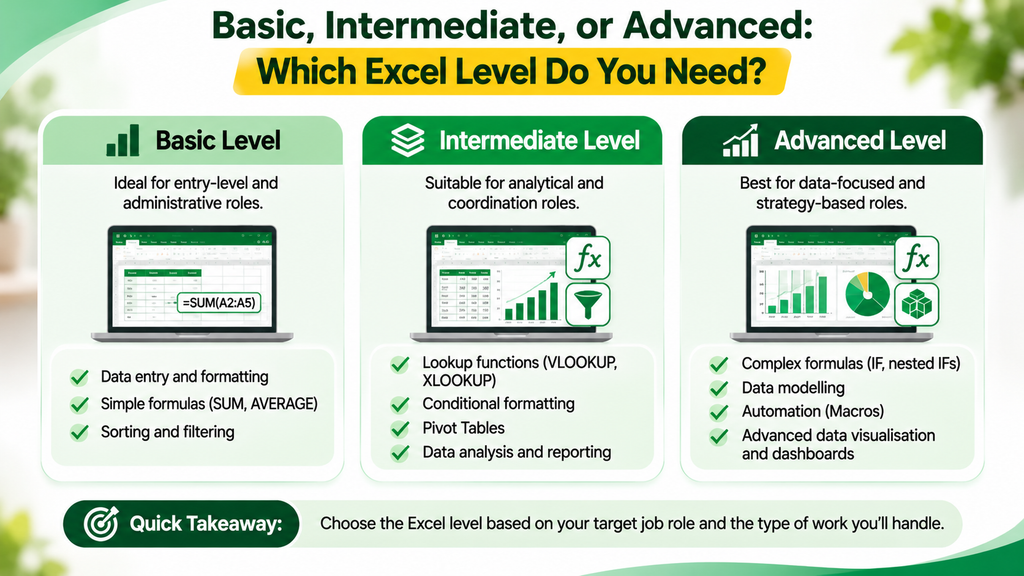
Not every job requires advanced Excel knowledge. The level of proficiency you need depends on the responsibilities of your target position and the type of data you will handle.
Understanding the three levels of Excel skills for jobs can help you focus on relevant functions instead of trying to learn everything at once.
Let’s understand what each level involves and which jobs you can target.
1. Basic Excel Skills
Basic Excel is suitable for beginners who have little or no experience working with spreadsheets. At this level, you should know how to enter information, organize data, and perform simple calculations.
Important skills to learn:
- Data Entry: Entering, editing, and organizing information in cells.
- Cell Formatting: Changing font styles, colors, borders, and number formats.
- Sorting and Filtering: Arranging information and finding specific records.
- Basic Formulas: Using SUM, AVERAGE, MIN, and MAX for calculations.
- Basic Charts: Creating simple bar, column, and pie charts.
- Cell References: Understanding relative and absolute cell references.
Example: An employee working in a data entry position may use Excel to maintain customer details, update records, and calculate the total number of entries.
Jobs you can target:
- Data Entry Executive
- Office Assistant
- Administrative Assistant
- Receptionist
- Back Office Executive
Who should learn this level?
Students, fresh graduates, and job seekers who are learning Excel for the first time should start with basic Excel.
2. Intermediate Excel Skills
Intermediate Excel involves working with larger datasets and using formulas to automate calculations and organize information.
At this level, you should be comfortable using multiple functions and preparing structured reports.
Important skills to learn:
- IF and Nested IF: Applying conditions to return specific results.
- COUNTIF and SUMIF: Counting and adding values based on selected conditions.
- VLOOKUP and XLOOKUP: Finding specific information within datasets.
- Conditional Formatting: Highlighting important information based on conditions.
- Data Validation: Creating dropdown lists and controlling data entry.
- Pivot Tables: Summarizing and analyzing large datasets.
- Text Functions: Using LEFT, RIGHT, MID, and CONCAT to manage text.
Example: An HR executive can use COUNTIF to calculate the number of employees present or absent in a particular month.
Jobs you can target:
- HR Executive
- Accounts Assistant
- MIS Executive
- Operations Executive
- Sales Coordinator
Who should learn this level?
Freshers who want to apply for corporate jobs involving reporting, employee management, financial records, or business operations should aim for intermediate Excel proficiency.
3. Advanced Excel Skills
Advanced Excel focuses on complex calculations, data analysis, reporting, and automation. It is particularly useful for positions where employees regularly work with large datasets.
At this level, you should be able to analyze information, build dashboards, and simplify repetitive tasks.
Important skills to learn:
- INDEX and MATCH: Finding and retrieving information from datasets.
- Advanced IF Functions: Applying multiple conditions to calculations.
- Advanced Pivot Tables: Analyzing and summarizing complex datasets.
- Power Query: Importing, cleaning, and transforming data.
- Dashboard Creation: Presenting important business information through interactive reports.
- Macros and VBA: Automating repetitive spreadsheet tasks.
- Advanced Charts: Creating visual reports to communicate business insights.
Example: A data analyst can use Power Query to clean sales data, Pivot Tables to summarize performance, and charts to create a monthly sales dashboard.
Jobs you can target:
- MIS Analyst
- Reporting Analyst
- Junior Data Analyst
- Financial Analyst
- Business Analyst
Who should learn this level?
Candidates interested in data analysis, financial reporting, business intelligence, and analytical roles should consider learning advanced Excel.
Which Excel Skills Do Interviewers Actually Test?
Knowing Excel is one thing; demonstrating your knowledge during an interview is another. Many employers conduct practical Excel tests to evaluate how well candidates organize data, perform calculations, and prepare reports.
If you are preparing for an entry-level position, focus on these five important Excel skills for jobs.
1. Data Formatting
Data formatting makes spreadsheet information organized and easier to understand.
Important skills:
- Adjusting column widths and row heights.
- Applying borders, colors, and font styles.
- Formatting dates, percentages, and currency.
- Sorting and filtering information.
- Freezing header rows.
Interview task: Format an employee database containing names, departments, joining dates, and salaries.
2. SUM and IF Functions
These are fundamental Excel functions used for calculations and decision-making.
SUM: Adds numbers from selected cells.
Example: =SUM(B2:B10)
This calculates the total of all values between B2 and B10.
IF: Checks whether a condition is true or false and returns a corresponding result.
Example: =IF(B2>=40,”Pass”,”Fail”)
This displays “Pass” if the marks are 40 or above and “Fail” otherwise.
Interview task: Calculate total expenses or identify employees who have achieved their sales targets.
3. VLOOKUP and XLOOKUP
These functions help retrieve specific information from a dataset.
VLOOKUP: Searches for a value in the first column of a table and returns corresponding information from another column.
Example:
=VLOOKUP(A2,D2:F10,3,FALSE)
XLOOKUP: Searches a selected range and returns the corresponding result from another range.
Example:
=XLOOKUP(A2,D2:D10,F2:F10,”Not Found”)
XLOOKUP offers greater flexibility and is available in supported newer Excel versions.
Interview task: Find an employee’s name or department using their employee ID.
4. Pivot Tables
Pivot tables help summarize and analyze large datasets without manually calculating every value.
Important applications:
- Calculating employee-wise sales.
- Comparing monthly revenue.
- Summarising department-wise expenses.
- Identifying top-performing products.
Interview task: Create a pivot table to calculate total sales generated by each employee.
5. Charts and Data Visualization
Charts convert numerical information into visuals, making comparisons and trends easier to understand.
Important chart types:
- Bar Chart: Compares different categories.
- Column Chart: Displays comparisons using vertical bars.
- Pie Chart: Shows how categories contribute to a total.
- Line Chart: Tracks changes over time.
- Combination Chart: Compares different datasets using multiple chart types.
Interview task: Create a chart to compare monthly sales performance over six months.
Create a sample employee database and practice formatting records, calculating salaries, finding employee details, and preparing department-wise reports. This will help you revise several important Excel functions through one practical exercise.
How Can You Learn Excel for Free in 30 Days?
You do not need an expensive course or paid certification to develop practical Excel skills. With consistent practice and the right learning resources, you can build a strong foundation in just 30 days.
This learning roadmap is designed for students, fresh graduates, and job seekers who want to develop Excel skills for jobs without spending money on training.
Follow this week-by-week plan to progress from basic spreadsheet operations to intermediate Excel functions.
Week 1: Learn Excel Basics (Days 1–7)
Start by understanding the Excel interface and learning how to organize spreadsheet information.
Skills to learn:
- Understanding rows, columns, and cells.
- Creating and saving workbooks.
- Entering and editing data.
- Formatting cells and tables.
- Sorting and filtering information.
- Using SUM, AVERAGE, MIN, and MAX.
Free resource: Microsoft Excel Support
Practice task: Create a student marksheet containing names, subject-wise marks, total scores, and averages.
Week 2: Understand Excel Formulas (Days 8–14)
Once you understand the basics, move towards formulas that help automate calculations and organize information.
Skills to learn:
- IF and nested IF.
- COUNTIF and SUMIF.
- Relative and absolute cell references.
- Basic text functions.
- Conditional formatting.
Free resource: Excel Functions and Formulas – Microsoft Support
Practice task: Create an employee attendance tracker that identifies present and absent employees using formulas.
Week 3: Learn Intermediate Excel (Days 15–21)
This week focuses on functions that are commonly useful in reporting, HR, accounts, and operations roles.
Skills to learn:
- VLOOKUP and XLOOKUP.
- Data validation and dropdown lists.
- Removing duplicate entries.
- Creating Pivot Tables.
- Working with larger datasets.
Free resource: Microsoft Excel Learning Resources
Practice task: Create a sales report showing employee-wise sales performance using lookup functions and pivot tables.
Week 4: Practice Reporting and Data Visualization (Days 22–30)
Use the final week to combine your learning and create a practical project that demonstrates your Excel knowledge.
Skills to learn:
- Creating charts and graphs.
- Building basic dashboards.
- Cleaning and organizing datasets.
- Analyzing business information.
- Revising important formulas.
Free resource: Google Sheets
Practice task: Build a monthly sales dashboard using sample data, pivot tables, and charts.
By the end of 30 days, you should have a basic understanding of important Excel functions and at least one practical project to showcase your skills.
Can ChatGPT Replace Excel Skills?
Artificial intelligence tools such as ChatGPT can make spreadsheet tasks easier, but they cannot completely replace Microsoft Excel skills.
ChatGPT can help you understand formulas, troubleshoot errors, generate sample datasets, and learn how to perform specific spreadsheet tasks.
For example, you can ask ChatGPT to:
- Explain the difference between VLOOKUP and XLOOKUP.
- Generate formulas for calculating employee salaries.
- Help identify and correct Excel errors.
- Explain how to create Pivot Tables.
- Generate sample datasets for practice.
However, you still need to understand how to apply formulas, organize information, and verify results.
Combining AI tools with practical Excel skills for jobs can improve your productivity and make routine workplace tasks easier.
Instead of depending entirely on AI, learn Excel fundamentals and use ChatGPT as a learning assistant.
Conclusion
Learning Excel can help you become job-ready and explore opportunities across industries. Whether you are interested in HR, finance, administration, operations, or data analysis, developing the right Excel skills for jobs can strengthen your resume and improve your employability.
You do not need to master every Excel function at once. Start with the basics, practice regularly, and gradually move towards intermediate and advanced concepts.
Here is what you should do next:
- Identify the type of job you want to apply for.
- Understand which Excel proficiency level it requires.
- Follow the 30-day free learning roadmap.
- Practice using sample datasets and real-world scenarios.
- Build a mini-project to showcase your skills on your resume.
Once you have developed your Excel skills, start exploring relevant opportunities through CareerGrowKaro Jobs. Discover entry-level openings, understand employer requirements, and take the next step towards building your career.
Remember: Employers are not just looking for candidates who know Excel. They want people who can use it to organize information, solve problems, and complete everyday workplace tasks efficiently.
Start learning today, practice consistently, and turn your Excel knowledge into a valuable career skill.
Frequently Asked Questions (FAQs)
1. Are Excel Skills for Jobs enough to get a job in India?
Excel skills can help you qualify for entry-level positions such as Data Entry Executive, Office Assistant, and certain MIS roles. However, most employers also expect communication, problem-solving, and role-specific skills.
2. How long does it take to learn Excel skills for jobs?
You can learn basic Excel in 1–2 weeks with regular practice. Intermediate skills, including VLOOKUP and Pivot Tables, may take another 2–4 weeks. Advanced Excel requires additional practice.
3. Which Excel certificate is best for Excel skills for jobs?
The Microsoft Office Specialist (MOS) certification is a recognized credential for demonstrating Microsoft Excel proficiency. However, employers also consider practical knowledge and the ability to complete Excel-based tasks.
4. What Excel skills for jobs are needed for a data entry position?
Basic Excel skills for data entry jobs include data entry and editing, cell formatting, sorting and filtering, basic formulas such as SUM and COUNT, removing duplicate entries, and maintaining accurate records.
5. Do freshers need advanced Excel skills for jobs?
No. Most entry-level positions require basic to intermediate Excel knowledge. However, advanced Excel can be beneficial when applying for MIS, reporting, and data analysis positions.